Robert C. Martin gave five objected oriented design principles, and the acronym “S.O.L.I.D” is used for it. Each letter of this acronym talks about one principle. When we use all the principles of SOLID, it becomes easier for us to develop software that can be managed easily. The popularity of SOLID became apparent because of the following reasons:
It avoids code smells
Quickly refactor code
Can do adaptive or agile software development
Now, we will look into each of the principle.
S: Single Responsibility
One class should have one and only one responsibility
Write, change and maintain a class for only one purpose. This gives the flexibility to make changes in future without worrying the impacts of changes for another entity.
O: Open-Closed Principle
Software components should be open for extension, closed for modification.
Classes should be designed in such a way that whenever fellow developers wants to change the flow of control in specific conditions in application, all they need to do is extend the class and override some functions.
L: Liskov’s Substitution Principle
Derived types must be completely substitutable for their base types
Classes created by other developers by extending your class should be able to fit in application without failure
If a developer poorly extended some part of your class and injected into framework or application, then it should not break the application or throw fatal exceptions.
I: Interface Segregation Principle
Clients should not be forced to implement unnecessary methods which they will not use.
Consider an example, an interface Reportable has two methods generateExcel() and generatePdf(). Now, suppose client A wants to use the interface but he intends to use the reports only in PDF format and not in Excel format. Unnecessarily he will be forced to implement both methods. The ideal solution in this case will be to extend Reportable and create two interfaces PdfReportable and ExcelReportable.
D: Dependency Inversion Principle
Depend on abstractions, not on concretions.
Design the application in such a way that various modules can be separated from each other using an abstract layer to bind them together. eg: BeanFactory in Spring framework
High level modules should not depend on low level modules
Abstractions should not depend on details. Details should depend on abstraction.
With dependency inversion, we can test classes independently.
An Oracle database is a collection of data treated as a unit.
The purpose of a database is to store and retrieve related information. Oracle is a relational database which stores related data together in tables.
A database server is the key to solving the problems of information management. In general, a server reliably manages a large amount of data in a multiuser environment so that many users can concurrently access the same data. All this is accomplished while delivering high performance. A database server also prevents unauthorized access and provides efficient solutions for failure recovery.
SQL (Structured Query Language) and PL/SQL (Procedural Language extension to SQL) form the core of Oracle’s application development stack. Not only do most enterprise back-ends run SQL, but Web applications accessing databases do so using SQL (wrapped by Java classes as JDBC), Enterprise Application Integration applications generate XML from SQL queries, and content-repositories are built on top of SQL tables.
PL/SQL is generally used by database developers to write procedural extensions (sequence of SQL statements combined into a single procedural block) such as Stored Procedures, functions and triggers.
SQL
SQL (pronounced SEQUEL) is the programming language that defines and manipulates the database.
Overview of Schemas and Common Schema Objects
A schema is a collection of database objects. A schema is owned by a database user and has the same name as that user.
Schema objects are the logical structures that directly refer to the database’s data. Schema objects include structures like tables, views, and indexes. (There is no relationship between a tablespace and a schema.
Objects in the same schema can be in different tablespaces, and a tablespace can hold objects from different schemas.)
Some of the most common schema objects are defined in the following section.
Tables:
Tables are the basic unit of data storage in an Oracle database. Database tables hold all user-accessible data.
Each table has columns and rows. A table that has an employee database, for example, can have a column called employee number, and each row in that column is an employee’s number.
Indexes:
Indexes are optional structures associated with tables. Indexes can be created to increase the performance of data retrieval. Just as the index in this manual helps you quickly locate specific information, an Oracle index provides an access path to table data.
When processing a request, Oracle can use some or all of the available indexes to locate the requested rows efficiently. Indexes are useful when applications frequently query a table for a range of rows (for example, all employees with a salary greater than 1000 dollars) or a specific row.
Indexes are created on one or more columns of a table. After it is created, an index is automatically maintained and used by Oracle. Changes to table data (such as adding new rows, updating rows, or deleting rows) are automatically incorporated into all relevant indexes with complete transparency to the users.
Views:
Views are customized presentations of data in one or more tables or other views.
A view can also be considered a stored query.
Views do not actually contain data. Rather, they derive their data from the tables on which they are based, referred to as the base tables of the views.
Like tables, views can be queried, updated, inserted into, and deleted from, with some restrictions. All operations performed on a view actually affect the base tables of the view.
Views provide an additional level of table security by restricting access to a predetermined set of rows and columns of a table. They also hide data complexity and store complex queries.
SQL Statements
All operations on the information in an Oracle database are performed using SQL statements. A SQL statement is a string of SQL text. A statement must be the equivalent of a complete SQL sentence, as in:
Table: Employee
Emp_id
First_name
Last_name
Dept_id
Salary
101
John
Melone
1
10000
102
Sarah
Winston
2
15000
103
Melissa
Baker
1
7800
104
Brian
Brown
1
9000
SELECT last_name, dept_id FROM employee;
The above query will return a result set as below.
Last_name
Dept_id
Melone
1
Winston
2
Baker
1
Brown
1
Please note, the column names or table names are NOT case sensitive, the data returned is. So if you want to display all upper case in Last_name, you need to use UPPER(last_name) in the query or LOWER(last_name) for all lower case.
Valid SQL syntax:
SELECT column_name1, column_name2 FROM table_name WHERE column_name1 operator valueGROUP BY column_name1 ORDER BY column_name1 asc | desc;
FROM clause – always required, to fetch a data from a particular table
WHERE clause – optional – to be used only when you want to filter the data based on some pre-conditions
GROUP BY clause – optional – only used when you want to select the data for a particular group (let’s say in our example, all the employees which belong to Dept_id = 1)
ORDER BY clause – optional – used only when you want to sort the results returned by the query based on a particular column_name. You get an option of sorting in Ascending (using asc) order or Descending (using desc) order. By default ORDER BY is used sorts the result set in Ascending order.
SQL statements are categorized into following three main categories:
Data Definition Language (DDL) Statements
These statements create, alter, maintain, and drop schema objects, mostly used by the developers or DBAs. DDL statements also include statements that permit a user to grant other users the privileges to access the database and specific objects within the database. These statements are auto-committed to database, this means, on executing these statements, the objects would get created (CREATE) or altered (ALTER) or dropped (DROP) OR table data will be truncated and could not be reverted. Examples include CREATE, ALTER, TRUNCATE and DROP.
Data Manipulation Language (DML) Statements
These statements manipulate data. For example, querying, inserting, updating, and deleting rows of a table are all DML operations. The most common SQL statement is the SELECT statement, which retrieves data from the database. Locking a table or view and examining the execution plan of a SQL statement are also DML operations. After executing these statements you generally need to COMMIT (Saves the data) or ROLLBACK (restores the data to the point as it was before the execution of the previous statements) the transactions to save the data in the database. Examples include SELECT, UPDATE, and INSERT.
Transaction Control Statements
These statements manage the changes made by DML statements. They enable a user to group changes into logical transactions. Examples include COMMIT, ROLLBACK, and SAVEPOINT.
Test engineers would be using only DML and Transaction Control statements.
SQL Statements examples:
Operators in The WHERE Clause
The following operators can be used in the WHERE clause:
Operator
Description
=
Equal
<>
Not equal. Note: In some versions of SQL this operator may be written as !=
>
Greater than
<
Less than
>=
Greater than or equal
<=
Less than or equal
BETWEEN
Between an inclusive range
LIKE
Search for a pattern
IN
To specify multiple possible values for a column
Table: Employee
Emp_id
First_name
Last_name
Dept_id
Salary
101
John
Melone
1
10000
102
Sarah
Winston
2
15000
103
Melissa
Baker
1
7800
104
Brian
Brown
1
9000
SELECT * FROM employee WHERE emp_id = 101; –Numeric column referred directly
The above query will return a result set as below.
Emp_id
First_name
Last_name
Dept_id
Salary
101
John
Melone
1
10000
SELECT * FROM employee WHERE emp_id > 102; –Numeric column referred directly
The above query will return a result set as below.
Emp_id
First_name
Last_name
Dept_id
Salary
103
Melissa
Baker
1
7800
104
Brian
Brown
1
9000
SELECT * FROM employee WHERE UPPER(last_name) LIKE ‘%BAKER’;
–CHAR/ VARCHAR column referred in single quotes, % is used as a wild card for pattern matching
The above query will return a result set as below.
Emp_id
First_name
Last_name
Dept_id
Salary
103
Melissa
Baker
1
7800
SELECT * FROM employee WHERE Salary between 8000 AND 9000;
–BETWEEN used for a range both inclusive
The above query will return a result set as below.
Emp_id
First_name
Last_name
Dept_id
Salary
104
Brian
Brown
1
9000
SELECT * FROM employee WHERE emp_id IN (103, 104);
–IN is used for multiple selection
The above query will return a result set as below.
Emp_id
First_name
Last_name
Dept_id
Salary
103
Melissa
Baker
1
7800
104
Brian
Brown
1
9000
Logical Operators AND, OR and NOT (NOT keyword or ! sign or <> sign)
SELECT * FROM employee WHERE emp_id = 101 AND first_name = ‘John’;
The above query will return a result set as below.
Emp_id
First_name
Last_name
Dept_id
Salary
101
John
Melone
1
10000
SELECT * FROM employee WHERE emp_id = 103 OR first_name = ‘Brian;
The above query will return a result set as below.
Emp_id
First_name
Last_name
Dept_id
Salary
103
Melissa
Baker
1
7800
104
Brian
Brown
1
9000
SELECT * FROM employee WHERE emp_id = 103 AND first_name <> ‘Brian; –Use of NOT (<>)
The above query will return a result set as below.
Emp_id
First_name
Last_name
Dept_id
Salary
103
Melissa
Baker
1
7800
SELECT * FROM employee WHERE emp_id NOT IN (101, 102, 104); –Use of NOT keyword
The above query will return a result set as below.
Emp_id
First_name
Last_name
Dept_id
Salary
103
Melissa
Baker
1
7800
These operators can also be combined in a single SQL query where required.
SELECT * FROM employee WHERE (emp_id = 103 AND first_name = ‘Melissa’) OR dept_id = 2;
The above query will return a result set as below.
Emp_id
First_name
Last_name
Dept_id
Salary
102
Sarah
Winston
2
15000
103
Melissa
Baker
1
7800
ORDER BY (Sorting)
SELECT * FROM employee ORDER BY dept_id;
The above query will return a result set as below.
Emp_id
First_name
Last_name
Dept_id
Salary
101
John
Melone
1
10000
103
Melissa
Baker
1
7800
104
Brian
Brown
1
9000
102
Sarah
Winston
2
15000
SELECT * FROM employee ORDER BY dept_id ASC, Salary DESC;
The sorting takes place in the order of the columns, here first it will sort by DEPT_ID ASC and then Salary Descending order. The above query will return a result set as below.
Emp_id
First_name
Last_name
Dept_id
Salary
101
John
Melone
1
10000
104
Brian
Brown
1
9000
103
Melissa
Baker
1
7800
102
Sarah
Winston
2
15000
Insert Statements (To insert a new row of the data into the table)
Syntax to add a row with having data for all columns:
INSERT INTO table_name VALUES (value1, value2, value3,…);
Syntax to add a row with having data for a few specific columns:
INSERT INTO table_name (column1, column2, column3) VALUES (value1, value2, value3);
INSERT INTO employee VALUES( 105, ‘Ron’, ‘Wild’, 2, 12000);
COMMIT;
Then execute below select query.
SELECT * from employee;
The above query will return a result set as below.
The above query will return a result set as below.
Emp_id
First_name
Last_name
Dept_id
Salary
101
John
Melone
1
10000
102
Sarah
Winston
2
15000
103
Melissa
Baker
1
7800
104
Brian
Brown
1
9000
105
Ron
Wild
2
12000
106
Jonathan
Reese
1
NULL
Update Statements (To modify the data for an existing record in the table)
Syntax to update all the records together:
UPDATE table_name SET column1 = value1, column2 = value2, …;
Syntax to update only a few columns for a few records based on WHERE clause:
UPDATE table_name SET column1 = value1, column2 = value2 WHERE column3 = some_value;
UPDATE employee SET last_name = ‘Schmidt’ WHERE last_name = ‘Wild’;
COMMIT;
Then execute below select query.
SELECT * from employee WHERE emp_id = 106;
The above query will return a result set as below.
Emp_id
First_name
Last_name
Dept_id
Salary
106
Ron
Schmidt
1
NULL
Delete Statements ( To delete a row from the table):
DELETE FROM table_name WHERE some_column=some_value;
DELETE FROM employee WHERE emp_id = 106;
COMMIT;
Notice the WHERE clause in the SQL DELETE statement! The WHERE clause specifies which record or records that should be deleted. If you omit the WHERE clause, all records will be deleted!
Then execute below select query.
SELECT * from employee WHERE emp_id = 106;
The above query will return a result set as below.
No record found
SQL Aggregate Functions
SQL aggregate functions return a single value, calculated from values in a column.
Useful aggregate functions:
AVG() – Returns the average value
COUNT() – Returns the number of rows
FIRST() – Returns the first value
LAST() – Returns the last value
MAX() – Returns the largest value
MIN() – Returns the smallest value
SUM() – Returns the sum
Table: Employee
Emp_id
First_name
Last_name
Dept_id
Salary
101
John
Melone
1
10000
102
Sarah
Winston
2
15000
103
Melissa
Baker
1
7800
104
Brian
Brown
1
9000
Table: Department
Dept_id
Dept_name
1
IT
2
Networking
3
Sales
4
Marketing
SELECT COUNT(*) FROM employee;
The above query will return a result set as below.
Result
4
SELECT MIN(SALARY) FROM employee;
The above query will return a result set as below.
Result
7800
SELECT MAX(DEPT_ID) FROM employee;
The above query will return a result set as below.
Result
2
SQL JOINS
There are two types of JOINS – Inner JOIN and Outer Join.
Inner JOIN Examples:
The INNER JOIN keyword selects all rows from both tables as long as there is a match between the columns in both tables.
SELECT column_name(s) FROM table1 INNER JOIN table2 ON table1.column_name=table2.column_name;
Table: Employee
Emp_id
First_name
Last_name
Dept_id
Salary
101
John
Melone
1
10000
102
Sarah
Winston
2
15000
103
Melissa
Baker
1
7800
104
Brian
Brown
1
9000
105
Roxy
Smith
5
5000
Table: Department
Dept_id
Dept_name
1
IT
2
Networking
3
Sales
4
Marketing
SELECT employee.emp_id, employee.first_name, employee.last_name, department.dept_name FROM employee INNER JOIN department ON employee.dept_id = department.dept_id;
The above query will return a result set as below.
Emp_id
First_name
Last_name
Dept_name
101
John
Melone
IT
102
Sarah
Winston
Networking
103
Melissa
Baker
IT
104
Brian
Brown
IT
Outer JOIN examples:
SQL LEFT JOIN Keyword
The LEFT JOIN keyword returns all rows from the left table (table1), with the matching rows in the right table (table2). The result is NULL in the right side when there is no match.
SELECT column_name(s) FROM table1 LEFT OUTER JOIN table2 ON table1.column_name=table2.column_name;
In some databases LEFT JOIN is called LEFT OUTER JOIN.
SELECT employee.emp_id, employee.first_name, employee.last_name, department.dept_name FROM employee LEFT OUTER JOIN department ON employee.dept_id = department.dept_id;
The above query will return a result set as below.
Emp_id
First_name
Last_name
Dept_name
101
John
Melone
IT
102
Sarah
Winston
Networking
103
Melissa
Baker
IT
104
Brian
Brown
IT
105
Roxy
Smith
NULL
SQL RIGHT JOIN Keyword
The RIGHT JOIN keyword returns all rows from the right table (table2), with the matching rows in the left table (table1). The result is NULL in the left side when there is no match.
SELECT column_name(s) FROM table1 RIGHT OUTER JOIN table2 ON table1.column_name=table2.column_name;
SELECT employee.emp_id, employee.first_name, employee.last_name, department.dept_name FROM employee RIGHT OUTER JOIN department ON employee.dept_id = department.dept_id;
The above query will return a result set as below.
Large up front investment – Organization needs to plan on the capacity and location of the data center, whether they re-use the existing data center and upgrade them or build new
Forecasting demand is difficult
Slow to deploy new data centers and servers – difficult to meet the demand overnight
Maintaining data centers is expensive
You own all of the security and compliance burden to ensure against hacker attacks
Benefits of Cloud Computing
Trade capital expenses for variable expenses – instead of capital investment into a new data center, you can purchase server space on the cloud and only pay as long as you use it and throw it off once not needed
Benefit from massive economies of scale – Amazon buys the data centers and infrastructure needed for maintenance when available at lowest price and passes on this pricing to consumers
Stop guessing capacity – you can grow or shrink the space needed based on demand
Increase speed and agility
Stop spending money maintaining data centers
Go global in minutes
Why AWS Cloud?
Elasticity – ability to acquire resources as you need them and release resources when you no longer need them.
Reliability – ability to provide functionality for its users when it is needed
Agility –
Cloud lowers the cost of trying new ideas or business processes
Reduces time required to maintain infrastructure
Reduces risk for organization around security and compliance
Provides access to emerging technology
AWS Interfaces
Three ways to use AWS
AWS Management Console – Easy to use graphical interface that supports majority of Amazon Web services
Navigation
Usability
Convenient mobile app
Command Line Interface (CLI) – Access through discrete command
Programming language agnostic
Flexibility to create scripts
Software Development Kits (SDKs) – Incorporate connectivity and functionality into your code
Ability to use AWS in existing applications
flexibility to create applications
AWS Cloud Core Services
Infrastructure as a Service products (IaaS) – Services that give you direct control over underlying compute and storage resources
Platform as a Service products (PaaS) – Services that hide infrastructure complexity behind a simple interface
Software as a Service products (SaaS) – Services that provide a service to end users through a public network
Serverless architectures (AWS Lambda) – Platforms that allow developers to run their code over short periods on cloud servers
AWS EC2 – Amazon Elastic Cloud Compute
Compute – Refers to the server resources that are being presented
Cloud – Refers to Cloud hosted compute resources
Elastic – Refers to scale up or down compute resources as required
Amazon EC2 instances:
Pay as you go
Broad selection of Hardware / Software – based on different storage requirements
Global hosting
Amazon EBS – Elastic Block Store
EBS volumes are used when you want to increase the disk space – choose between HDD and SSD types – you can delete them when you don’t need them and stop paying for it
Persistent and customizable block storage for EC2 instances
Replicated in the same Availability Zone
Backup using Snapshots
Easy and transparent Encryption
Elastic volumes – Scale up or down as needed, you can change between available drive types
Storing Application assets such as user generated media files, server logs or other files or applications on common location
Static Web Hosting
High durability making easier backup and disaster recovery, cross region replication
Staging area for Big Data – Scalable
AWS Global Infrastructure
Regions – Optimize latency, minimize costs and adhere to regulatory requirements such as GDPR, HIPAA and PCI DSS.
Availability Zones –
Collection of data centers in a specific region.
Multiple, isolated locations within one geographic area
Each Availability Zone is physically isolated from others but connected together by a fast low-latency network.
Edge locations – host the Content Delivery Network (CDN) called Amazon CloudFront. CloudFront is used to deliver content to the customers. Edge locations help Quicker content delivery.
A region is not a collection of VPCs, it is composed of at least 2 AZs. VPCs exist within accounts on a per region basis
Availability Zones (not regions) have direct, low-latency, high throughput and redundant network connections between each other
Edge locations are (not regions) are Content Delivery Network (CDN) endpoints for CloudFront
Amazon VPC – Virtual Private Cloud
VPC is the networking AWS service
A private, virtual network in the AWS Cloud – uses same concepts as on-premise networking
Allows complete control of network configuration – ability to isolate and expose resources inside VPC
Offers several layers of security controls – ability to allow and deny specific internet and internal traffic
Other AWS services deploy into VPC – Services inherent security built into network
Features:
AWS Integrated Services
Application Load Balancer
Elastic Load Balancing supports three types of load balancers: Application Load Balancers, Network Load Balancers, and Classic Load Balancers.
Classic Load Balancers:
A load balancer distributes incoming application traffic across multiple EC2 instances in multiple Availability Zones. This increases the fault tolerance of your applications. Elastic Load Balancing detects unhealthy instances and routes traffic only to healthy instances.
Your load balancer serves as a single point of contact for clients. This increases the availability of your application. You can add and remove instances from your load balancer as your needs change, without disrupting the overall flow of requests to your application. Elastic Load Balancing scales your load balancer as traffic to your application changes over time. Elastic Load Balancing can scale to the vast majority of workloads automatically.
Using a Classic Load Balancer instead of an Application Load Balancer has the following benefits:
Support for EC2-Classic
Support for TCP and SSL listeners
Support for sticky sessions using application-generated cookies
Network Load Balancers:
A Network Load Balancer functions at the fourth layer of the Open Systems Interconnection (OSI) model. It can handle millions of requests per second. After the load balancer receives a connection request, it selects a target from the target group for the default rule. It attempts to open a TCP connection to the selected target on the port specified in the listener configuration.
Using a Network Load Balancer instead of a Classic Load Balancer has the following benefits:
Ability to handle volatile workloads and scale to millions of requests per second.
Support for static IP addresses for the load balancer. You can also assign one Elastic IP address per subnet enabled for the load balancer.
Support for registering targets by IP address, including targets outside the VPC for the load balancer.
Support for routing requests to multiple applications on a single EC2 instance. You can register each instance or IP address with the same target group using multiple ports.
Support for containerized applications. Amazon Elastic Container Service (Amazon ECS) can select an unused port when scheduling a task and register the task with a target group using this port. This enables you to make efficient use of your clusters.
Support for monitoring the health of each service independently, as health checks are defined at the target group level and many Amazon CloudWatch metrics are reported at the target group level. Attaching a target group to an Auto Scaling group enables you to scale each service dynamically based on demand.
Application Load Balancers:
Offers most of the features provided by Classic Load Balancer, adds some newly enhanced features for unique use cases
enhanced Supported protocols – HTTP, HTTPS, HTTP/2 and WebSockets
CloudWatch Metrics
Access logs – additional details in access logs
More target Health checks
Additional features:
Ability to enable additional routing mechanisms using path and host-based routing –
Path-based provides rules that forward requests to different target groups based on the URL in the request
Host-based can be used to define rules that forward requests to different target groups based on host name/ domain requested
Native IPv6 support in VPC
AWS Web Application Firewall (WAF) support
Dynamic ports
Deletion protection and request tracing
Why use Application Load Balancers?
ability to use containers to host your micro-services
Auto Scaling
Auto scaling helps you ensure that you have the correct number of Amazon EC2 instances available to handle the load for your application
For monitoring resource performance you use Amazon CloudWatch. CloudWatch by itself does NOT add or remove EC2 instances for auto scaling
Auto scaling enables two AWS best practices:
Scalability – Making environment scalable
Automation – Automating EC2 resource provisioning to occur on-demand
Auto scaling can scale the number of EC2 instances based on the conditions you define – eg: CPU utilization over 80%
What is Scaling?
Scaling Out – when auto scaling launches new instances
Scaling In – when auto scaling terminates instances
Auto Scaling Components:
AMI – Amazon Machine Image
Amazon Route 53
Is a Domain Name System (DNS) service.
Global, reliable and highly scalable service used to route users to the desired endpoints (applications).
Public and private DNS names
Compliant with both IPv4 and IPv6
Amazon Route 53 is an authoritative Domain Name System (DNS) service. DNS is the system that translates human-readable domain names (example.com) into IP address (192.0.2.0). With authoritative name servers in data centers all over the world, Route 53 is reliable, scalable and fast.
Offers several other DNS resolution strategies
Simple routing
Geo-location
Failover
Weighted round robin
Latency based
Multi-value answer
Amazon Relational Database Service (RDS)
Challenges of running your own Relational Databases:
Server maintenance and energy footprint
Software install and patches
Database backups and high availability
Limits on scalability
Data security
OS install and patches
Amazon RDS is a managed service that sets up and operates a relational database in the cloud.
Sets up
operates
scales your relational database without any administration
provides cost-efficient and resizable capacity
Amazon RDS frees you to focus on your applications so you can give them the performance, security and capability they need.
With Amazon RDS –
you manage application optimization
AWS manages:
OS installation and patches
Database software install and patches
Database backups
High availability
Scaling
Power and rack & stack
Server maintenance
One of the powerful features of Amazon RDS you can have your relational DB with high availability multi-AZ deployment
With HA Multi AZ deployment, another stand alone instance is stood up by Amazon RDS and it is synchronous with the Master. On failover of master, the Application automatically makes Slave as the new master and thus ensures HA.
Read replicas with asynchronous replication features, available only when configured
Use cases:
Amazon RDS benefits
Highly scalable – no downtime
High performance – OLTP
Easy to administer
Available and durable
Secure and compliant
AWS Lambda
fully-managed serverless compute
event-driven execution
sub-second metering
multiple languages supported
Use cases:
Automated backups
Processing objects uploaded to S3 buckets
event-driven log analysis
event-driven transformations
Internet of Things (IoT)
Operating Serverless websites
Amazon Elastic Beanstalk
to get your application into the cloud quickly
it’s a Platform as a Service (PaaS)
allows quick deployment of your applications
reduces management complexity
keeps control in your hands
choose your instance type
choose your database
set and adjust Auto Scaling
update your application
access server log files
enable HTTPS on load balancer
Supports a large range of platforms
Packer builder
Single Container, Multicontainer or Preconfigured Docker
Go
Java SE
Java with Tomcat
.NET on Windows server with IIS
Node.js
PHP
Python
Ruby
Easily implemented – your focus is only on your code
Update your application as easily as you deployed it – Once the application is deployed for the first time, all new versions just need you to update version and then deploy the new version.
Amazon Simple Notification Service (SNS)
Flexible, fully-managed pub/ sub messaging and mobile communications service
Coordinates the delivery of messages to subscribing endpoints and clients
Easy to setup, operate and send reliable communications
Decouple and scale microservices, distributed systems and serverless applications
Amazon CloudWatch
Monitoring service
Amazon CloudWatch monitors your Amazon Web Services (AWS) resources and the applications you run on AWS in real time
Some of the features:
Collect and track metrics – CPU, Disk utilizations
Collect and monitor log files
Set alarms
Automatically react to changes
Amazon CloudWatch Architecture:
Use cases:
Respond to state changes in your AWS resources
Automatically invoke an AWS Lambda function to update DNS entries when an event notifies that Amazon EC2 instance enters the Running state
Direct specific API records from CloudTrail to a Kinesis stream for detailed analysis of potential security or availability risks
Take a snapshot of an Amazon EBS volume on a schedule
Log S3 Object Level Operations using CloudWatch events
Components:
Metrics – represents a time-ordered set of data points that are published to CloudWatch, data about the performance of the systems
Alarms – Watches a single metric, performs one or more actions (eg: Amazon EC2 action – stop/ terminate / reboot or recover, Auto Scaling action, A notification sent to an Amazon SNS topic) based on the value of metric relative to a threshold over a number of time periods, Invokes actions for sustained state changes only
Events – Near real-time stream of system events that describe changes in AWS resources, use simple rules to match events and route them to one or more target functions or streams
Logs – monitor logs for specific phrases, values or patterns, includes an installable agent for Ubuntu, Amazon Linux and Windows at no additional cost
Dashboards – Customizable home page in CloudWatch console to monitor your resources in a single view even those resources that are spread across different regions
Amazon CloudFront
is a Content Delivery Network (CDN)
Global, growing network – Low latency
Secure content at the Edge locations
Deep integration with key AWS services
High performance
Cost effective
Easy to use
Content is still served from cache when the service deployed on the actual region has crashed
Use cases:
Static Asset Caching
Live and On-demand video streaming
Security and DDoS Protection
Dynamic and customized content
API Acceleration
Software distribution
Amazon CloudFormation
Amazon CloudFormation simplifies the task of repeatedly and predictably creating groups of related resources that power your applications
Fully-managed service – no infrastructure
create, update and delete resources in stacks
CloudFormation reads template file, lists resources on stack
Can be controlled through AWS management console, AWS CLI or AWS SDK/ API
Stacks – Resources generated, unit of deployment, create, update, delete Stack
Templates – resources to provision, text file – JSON or YAML format, self-documenting environment, each template is an example of Infrastructure as a Code
CloudFormation requirements:
Templates
Permissions to all the services specified in the template
AWS Cloud Architecture
AWS Well-Architected Framework – Five Pillars
Security –
encompasses the ability to protect your information, assets and systems in five areas
Identity and access management (IAM) – ensures only authorized and authenticated users are able to access your resources and only in manner you intend
Detective controls – can be used to identify a potential security incident by capturing and analyzing logs and integrating auditing controls
Infrastructure protection – protection against unintended and unauthorized access
Data protection – encryption, data backup, recovery, replication
Incident response – respond and mitigate the incident
Design principles:
Implement security at all layers
Enable traceability
Apply principle of least privilege
Focus on securing your system
Automate security best practices
Reliability
Areas:
Recover from issues/ failures
Apply best practices in:
Foundations
Change management
Failure management
Anticipate, respond and prevent failures
Design principles:
Test recovery procedures
Automatically recover
Scale horizontally
Stop guessing capacity
Manage change in automation
Performance efficiency
Areas:
Select customizable solutions
Review to continually innovate
Monitor AWS services
Consider the trade-offs
Design principles:
Democratize advanced technologies
Go global in minutes
Use serverless architectures
Experiment more often
Have mechanical sympathy – use the technological approach to best align with the goal you want to achieve
Cost optimization
Areas:
Use cost-effective resources
Matching supply with demand – leverage elasticity to meet the demand
Increase expenditure awareness
Optimize over time
Design principles:
Adopt a consumption model
Measure overall efficiency
Reduce spending on data center operations
Analyze and attribute expenditure
Use managed services
Operational excellence
Areas:
Manage and automate changes
Respond to events
Define the standards to manage daily operations
Design principles:
Prepare
Operate
Evolve
Fault Tolerance
Ability of a system to remain operational even if some of the components fail
Built-in redundancy of an application’s components
Fault Tolerant tools:
Amazon Simple Queue Service (SQS) – highly reliable, distributed messaging service, ensures that your queue is always available
Amazon Relational Database Service (RDS) – set up, operate and scale your relational DBs
High Availability
ensures that Systems are generally functioning and accessible
downtime is minimized
minimal human intervention is required
minimal up-front financial investment
High Availability Service Tools:
Elastic Load Balancers – distributes incoming traffic (load), sends metrics to Amazon CloudWatch, triggers / notifies high latency and over-utilization
Elastic IP addresses – static IP addresses, mask failures if they were to occur, continues to access applications if an instance fails
Amazon Route 53 – Authoritative DNS service
Auto Scaling – launches / terminates instances based on specific conditions based on customer demand
Amazon CloudWatch – distributed statistics gathering system, collects and tracks metrics of your infrastructure, used with Auto scaling
Web Hosting
fast, easy to deploy, cost efficient
AWS Cloud Security
Scaled quickly
Shared Responsibility model
AWS 100% responsible – Physical, Network and Hypervisor
Customer 100% responsible – Guest OS, Application and User data
AWS are responsible for the “security of the cloud”. This includes protecting the infrastructure that runs all of the services offered in the AWS Cloud. This infrastructure is composed of the hardware, software, networking, and facilities that run AWS Cloud services.
The customer is responsible for “security in the cloud”. Customer responsibility depends on the service consumed but includes aspects such as Identity and Access Management (includes password policies), encryption of data, protection of network traffic, and operating system, network and firewall configuration.
Shared Controls– Controls which apply to both the infrastructure layer and customer layers, but in completely separate contexts or perspectives
Patch Management– AWS is responsible for patching and fixing flaws within the infrastructure, but customers are responsible for patching their guest OS and applications
Configuration Management– AWS maintains the configuration of its infrastructure devices, but a customer is responsible for configuring their own guest operating systems, databases, and applications
Service and Communications Protection is an example of a customer specific control
Storage system patching is an AWS responsibility
Physical and Environmental controls is an example of an inherited control (a customer fully inherits from AWS)
Identity and Access Management (IAM)
User – Permanent named operator, stay with the user until forced rotation, authentication mechanism
Group – Collections of users
Role – NOT permissions, it is authentication mechanism. Credentials with the role are temporary
Policy documents – JSON document containing the permissions -> Authorization
Amazon Inspector
Assesses applications for vulnerabilities and deviations from best practices
produces a detailed report with security findings and prioritized steps for remediation
agent based, API driven service
AWS Shield
a managed Distributed Denial of Service (DDoS) protection service that safeguards applications running on AWS
Difference between Denial of Service (DoS) vs DDoS attack:
DoS attack – A deliberate attempt to make your website or application unavailable to users like flooding it with network traffic
DDoS attack – Multiple sources are used to attack target, infrastructure and application layers can be affected
DDoS mitigation challenges:
Complex setup and implementation
Bandwidth limitations
Manual intervention
Time consuming
Degraded performance
Expensive
AWS Shield tiers: two options to mitigate DDoS challenges
Standard: Automatic protections available for all AWS customers at no additional charge
Automatic protection for any AWS resource at any AWS region,
quick detection of DDoS attack by always-on network flow monitoring,
automated mitigation service avoids latency impact,
self-service – no need to engage AWS support
Advanced: Paid 24×7 service for higher levels of protection, features and benefits
24×7 DDoS Response Team (DRT) support – they can be engaged before, during or after the DDoS attack
Customizable protection for mitigating Application layer attacks
Security Compliance
AWS Compliance includes three components:
Risk management: Re-evaluated at least biannually
Control environment: includes policies, processes and control activities to secure the delivery of AWS service offerings – operative effectiveness of AWS control framework
Information security: Designed to protect Confidentiality, Integrity and Availability
Pricing and Support
Pay only for the services you consume and once you stop using them, there is no additional charge for terminating
Pay as you go pricing
EC2 and RDS – Reserve space with all or little up-front investment
All Up-front – AURI – largest discount
Partial Up-front – PURI – small discount
No up-front – NURI – no discount
To maximize savings, the larger amount you pay up-front, the more discount you get
S3 and EC2 – tiered pricing – pay per GB
Custom pricing
Free usage tier for a year
AWS Cost fundamentals
Pay for:
Compute capacity
Storage
Outbound data transfer (aggregated)
No charge for inbound data transfer
Consolidated billing has the following benefits:
One bill – You get one bill for multiple accounts.
Easy tracking – You can track the charges across multiple accounts and download the combined cost and usage data.
Combined usage – You can combine the usage across all accounts in the organization to share the volume pricing discounts and Reserved Instance discounts. This can result in a lower charge for your project, department, or company than with individual standalone accounts.
No extra fee – Consolidated billing is offered at no additional cost
The only services that do not incur cost in this list are IAM and VPC
Free tier includes offers that expire after 12 months and offers that never expire.
Pricing policies include:
Pay as you go.
Pay less when you reserve.
Pay even less per unit when using more.
Pay even less as AWS grows.
Custom pricing (enterprise customers only).
Free services include:
Amazon VPC.
Elastic Beanstalk (but not the resources created).
CloudFormation (but not the resources created).
Identity Access Management (IAM).
Auto Scaling (but not the resources created).
OpsWorks.
Consolidated Billing.
Amazon EC2 – Provides resizable compute capacity in the cloud, charges only for capacity used
Cost factors:
Clock-second billing – Resources incur charges only when running
Instance configuration: Physical capacity of the instance, price varies with AWS region, OS, instance type and instance size
Purchase types:
On-demand instances: Compute capacity by seconds – minimum of 60 seconds
Reserved instances: Low or no up-front payment instances reserved, discount on hourly charge for that instance
Spot instances: Bid for unused Amazon EC2 capacity
Amazon S3 – Object storage built to store and retrieve any amount of data from anywhere. Pricing depends on –
Storage classes:
Standard storage: 99.999999999% durability, 99.99% availability
Storage cost: Number and size of objects, type of storage
Cost factors:
Requests: Number of requests, type of requests – different rates for GET requests when compared to PUTs and COPY
Data transfer: Amount of data transferred out of Amazon S3 region
Amazon Elastic Block Store (EBS) – Block-level storage for instances, volumes persist independently form the instance, analogous to virtual disks in the cloud, three volume types – General Purpose (SSD), Provisioned IOPS (SSD) and Magnetic
Cost factors:
Volumes: All types charged by the amount provisioned per month
IOPS: (Input/Output Operations Per Second)
General purpose (SSD) – included in price
Magnetic – Charged by number of requests
Provisioned IOPS (SSD): Charged by the amount you provision in IOPS
Snapshots: added cost per GB per month of the data stored
Data transfer – tiered pricing
Amazon RDS – Relational database in the cloud, cost-efficient, resizable capacity, management of time-consuming administrative tasks
Cost factors:
Clock-hour billing: Resources incur charges when running
Database characteristics: Engine, size, memory class impacts cost
DB purchase type:
On-demand database instances are charged by hour
Reserved DB instances require up-front payment
Provision multiple DB instances to handle peak loads
Provisioned storage:
No charge for backup storage of up to 100% of Database storage
Backup storage for terminated DB instances billed at per GB per month
Additional storage: Backup storage in addition to provisioned storage billed at per GB per month
Deployment type:
Storage and I/O charges variable
Single Availability Zones
Multiple Availability Zones
Data transfer:
No charge for inbound data transfer
Tiered charges for outbound data transfer
Amazon CloudFront – Web service for content delivery
Cost factors:
Pricing varies across geographic regions
Based on requests and outbound data transfer
AWS Trusted Advisor
provides best practices or checks in four categories – security, cost optimization, fault tolerance and performance
AWS Support plans
Basic support
Developer support
Business support
Enterprise support – Only plan that comes with a TAM
AWS Services at a glance
AWS Elastic Beanstalk can be used to quickly deploy and manage applications in the AWS Cloud. Developers upload applications and Elastic Beanstalk handles the deployment details of capacity provisioning, load balancing, auto-scaling, and application health monitoring
AWS CodeCommit is a fully-managed source control service that hosts secure Git-based repositories
AWS CodeDeploy is a fully managed deployment service that automates software deployments to a variety of compute services such as Amazon EC2, AWS Lambda, and your on-premises servers
Amazon Elastic Container Service (ECS) is a managed service for running Docker containers
Amazon Elastic Container Registry (ECR) is a fully-managed Docker container registry that makes it easy for developers to store, manage, and deploy Docker container images. Amazon ECR is integrated with Amazon Elastic Container Service (ECS), simplifying your development to production workflow. Amazon ECR eliminates the need to operate your own container repositories or worry about scaling the underlying infrastructure. Amazon ECR hosts your images in a highly available and scalable architecture, allowing you to reliably deploy containers for your applications. Integration with AWS Identity and Access Management (IAM) provides resource-level control of each repository. With Amazon ECR, there are no upfront fees or commitments. You pay only for the amount of data you store in your repositories and data transferred to the Internet.
AWS Systems Manager gives you visibility and control of your infrastructure on AWS. Systems Manager provides a unified user interface so you can view operational data from multiple AWS services and allows you to automate operational tasks across your AWS resources.
AWS OpsWorks is a configuration management service that provides managed instances of Chef and Puppet.
AWS Config is a fully-managed service that provides you with an AWS resource inventory, configuration history, and configuration change notifications to enable security and regulatory compliance.
Amazon CloudWatch is a monitoring service for AWS cloud resources and the applications you run on AWS. You use CloudWatch for performance monitoring, not automating operational tasks.
Amazon Elastic Map Reduce (EMR) provides a managed Hadoop framework that makes it easy, fast, and cost-effective to process vast amounts of data across dynamically scalable Amazon EC2 instance
Amazon Athena is an interactive query service that makes it easy to analyze data in Amazon S3 using standard SQL
ElastiCache is a data caching service that is used to help improve the speed/performance of web applications running on AWS. AWS Elasticache provides in-memory cache and database services.
Amazon RDS is Amazon’s relational database and is primarily used for transactional workloads
Amazon S3 is used for object storage, an object-based storage system that stores objects that are comprised of key, value pairs
Amazon Cognito lets you add user sign-up, sign-in, and access control to your web and mobile apps quickly and easily. Amazon Cognito scales to millions of users and supports sign-in with social identity providers, such as Facebook, Google, and Amazon, and enterprise identity providers via SAML 2.0
AWS Directory Service for Microsoft Active Directory, also known as AWS Managed Microsoft AD, enables your directory-aware workloads and AWS resources to use managed Active Directory in the AWS Cloud
AWS Artifact is your go-to, central resource for compliance-related information that matters to you
AWS CloudHSM is a cloud-based hardware security module (HSM) that enables you to easily generate and use your own encryption keys on the AWS Cloud
Amazon DynamoDB is a fully managed database services, NoSQL Database, stores items, not objects, based on key, value pairs
Amazon EBS is a block-based storage system. Can be used to run an ever changing database in an EC2 instance.
Amazon EFS is a file-based storage system
Amazon ELB distributes incoming requests to EC2 instances. It can be used in conjunction with Auto Scaling
Amazon Glacier is a reliable, secure, and inexpensive service to backup and archive data. Priced at $0.004 per GB.
Amazon CloudSearch is a managed service in the AWS Cloud that makes it simple and cost-effective to set up, manage, and scale a search solution for your website or application. Amazon CloudSearch supports 34 languages and popular search features such as highlighting, autocomplete, and geospatial search.
Amazon Elasticsearch Service is a fully managed service that makes it easy for you to deploy, secure, and run Elasticsearch cost effectively at scale. You can build, monitor, and troubleshoot your applications using the tools you love, at the scale you need. The service provides support for open source Elasticsearch APIs, managed Kibana, integration with Logstash and other AWS services, and built-in alerting and SQL querying.
AWS WAF is a web application firewall that helps protect your web applications or APIs against common web exploits that may affect availability, compromise security, or consume excessive resources. AWS WAF (Web Application Firewall) services can help protect your web applications from SQL injection and other vulnerabilities in your application code. AWS WAF can be used to monitor the HTTP and HTTPS requests that are forwarded to Amazon CloudFront.
AWS Key Management Service (AWS KMS) is a managed service that makes it easy for you to create and control customer master keys (CMKs), the encryption keys used to encrypt your data. AWS KMS CMKs are protected by hardware security modules (HSMs) that are validated by the FIPS 140-2 Cryptographic Module Validation Program except in the China (Beijing) and China (Ningxia) Regions.
AWS CloudTrail is an AWS service that helps you enable governance, compliance, and operational and risk auditing of your AWS account. Actions taken by a user, role, or an AWS service are recorded as events in CloudTrail. Events include actions taken in the AWS Management Console, AWS Command Line Interface, and AWS SDKs and APIs.
Using AWS Direct Connect, you can establish private connectivity between AWS and your datacenter, office, or colocation environment, which in many cases can reduce your network costs, increase bandwidth throughput, and provide a more consistent network experience than Internet-based connections (on-premise to AWS)
AWS Snowball is a data transport solution that accelerates moving terabytes to petabytes of data into and out of AWS using storage appliances designed to be secure for physical transport.
AWS tagging makes it easier for you to manage and filter your resources – A tag is a label that you assign to an AWS resource. Each tag consists of a key and an optional value, both of which you define. Tags enable you to categorize your AWS resources in different ways, for example, by purpose, owner, or environment.
Amazon Lightsail is an easy-to-use cloud platform that offers you everything needed to build an application or website, plus a cost-effective, monthly plan. It is the easiest way to launch and manage a virtual private server in AWS.
To improve the user experience, AWS Global Accelerator directs user traffic to the nearest application endpoint to the client, thus reducing internet latency and jitter. It routes the traffic to the closest edge location via Anycast, then by routing it to the closest regional endpoint over the AWS global network.
Amazon DynamoDB Accelerator (DAX) is a fully managed, highly available, in-memory cache for DynamoDB that delivers up to a 10x performance improvement – from milliseconds to microseconds – even at millions of requests per second. DAX does all the heavy lifting required to add in-memory acceleration to your DynamoDB tables, without requiring developers to manage cache invalidation, data population, or cluster management.
Amazon S3 Transfer Acceleration enables fast, easy, and secure transfers of files over long distances between your client and an S3 bucket. Transfer Acceleration takes advantage of Amazon CloudFront’s globally distributed edge locations. As the data arrives at an edge location, data is routed to Amazon S3 over an optimized network path.
Amazon Redshiftis a fast, simple, cost-effective data warehousing service.
Amazon VPC is the networking layer for Amazon EC2, create virtual network
AWS Marketplace enables customers to find, buy and immediately start using software solutions in their AWS environment.
You can have configured subnets and endpoints within the VPC section of AWS management console
EBS volumes and ELB must be configured in the EC2 section of the AWS management console
A monolithic application is built as a single and indivisible unit. Usually, such a solution comprises a client-side user interface, a server side-application, and a database. It is unified and all the functions are managed and served in one place.
Normally, monolithic applications have one large code base and lack modularity. If developers want to update or change something, they access the same code base. So, they make changes in the whole stack at once.
Pros
Cons
Less cross-cutting concerns. Cross-cutting concerns are the concerns that affect the whole application such as logging, handling, caching, and performance monitoring. In a monolithic application, this area of functionality concerns only one application so it is easier to handle it. Easier debugging and testing. Monolithic applications are much easier to debug and test. Since a monolithic app is a single indivisible unit, you can run end-to-end testing much faster. Simple to deploy. When it comes to monolithic applications, you do not have to handle many deployments – just one file or directory. Simple to develop. As long as the monolithic approach is a standard way of building applications, any engineering team has the right knowledge and capabilities to develop a monolithic application.
Understanding. When a monolithic application scales up, it becomes too complicated to understand. Also, a complex system of code within one application is hard to manage. Making changes. It is harder to implement changes in such a large and complex application with highly tight coupling. Any code change affects the whole system so it has to be thoroughly coordinated. This makes the overall development process much longer. Scalability. You cannot scale components independently, only the whole application. New technology barriers. It is extremely problematic to apply a new technology in a monolithic application because then the entire application has to be rewritten.
Microservices Architecture
A microservices architecture breaks it down into a collection of smaller independent units. These units carry out every application process as a separate service. So all the services have their own logic and the database as well as perform the specific functions.
Within a microservices architecture, the entire functionality is split up into independently deployable modules which communicate with each other through defined methods called APIs (Application Programming Interfaces). Each service covers its own scope and can be updated, deployed, and scaled independently.
Pros
Cons
Independent components. Firstly, all the services can be deployed and updated independently, which gives more flexibility. Secondly, a bug in one microservice has an impact only on a particular service and does not influence the entire application. Also, it is much easier to add new features to a microservice application than a monolithic one. Easier understanding. Split up into smaller and simpler components, a microservice application is easier to understand and manage. You just concentrate on a specific service that is related to a business goal you have. Better scalability. Another advantage of the microservices approach is that each element can be scaled independently. So the entire process is more cost- and time-effective than with monoliths when the whole application has to be scaled even if there is no need in it. In addition, every monolith has limits in terms of scalability, so the more users you acquire, the more problems you have with your monolith. Therefore, many companies, end up rebuilding their monolithic architectures. Flexibility in choosing the technology. The engineering teams are not limited by the technology chosen from the start. They are free to apply various technologies and frameworks for each microservice. The higher level of agility. Any fault in a microservices application affects only a particular service and not the whole solution. So all the changes and experiments are implemented with lower risks and fewer errors.
Extra complexity. Since a microservices architecture is a distributed system, you have to choose and set up the connections between all the modules and databases. Also, as long as such an application includes independent services, all of them have to be deployed independently. System distribution. A microservices architecture is a complex system of multiple modules and databases so all the connections have to be handled carefully. Cross-cutting concerns. When creating a microservices application, you will have to deal with a number of cross-cutting concerns. They include externalized configuration, logging, metrics, health checks, and others. Testing. A multitude of independently deployable components makes testing a microservices-based solution much harder.
There are several microservices frameworks that you can use for developing for Java. Some of these are:
Spring Boot: This is probably the best Java microservices framework that works on top of languages for Inversion of Control, Aspect Oriented Programming, and others.
Jersey: This open-source framework supports JAX-RS APIs in Java is very easy to use.
Swagger: Helps you in documenting API as well as gives you a development portal, which allows users to test your APIs.
Others that you can consider include: Dropwizard, Ninja Web Framework, Play Framework, RestExpress, Restlet, Restx, and Spark Framework.
Microservices With Spring Boot
Spring Boot gives you Java application to use with your own apps via an embedded server. It uses Tomcat, so you do not have to use Java EE containers.
Spring Boot has all the infrastructures that your applications need. It does not matter if you are writing apps for security, configuration, or big data; there is a Spring Boot project for it.
Spring Boot projects include:
Spring IO Platform: Enterprise-grade distribution for versioned applications.
Spring Framework: For transaction management, dependency injection, data access, messaging, and web apps.
Spring Cloud: For distributed systems and used for building or deploying your microservices.
Spring Data: For microservices that are related to data access, be it map-reduce, relational or non-relational.
Spring Batch: For high levels of batch operations.
Spring Security: For authorization and authentication support.
Spring REST Docs: For documenting RESTful services.
Spring Social: For connecting to social media APIs.
Spring Mobile: For mobile Web apps.
Why Spring Boot?
You can choose Spring Boot because of the features and benefits it offers as given here −
It provides a flexible way to configure Java Beans, XML configurations, and Database Transactions.
It provides a powerful batch processing and manages REST endpoints.
In Spring Boot, everything is auto configured; no manual configurations are needed.
It offers annotation-based spring application
Eases dependency management
It includes Embedded Servlet Container
How does it work?
Spring Boot automatically configures your application based on the dependencies you have added to the project by using @EnableAutoConfiguration annotation. For example, if MySQL database is on your classpath, but you have not configured any database connection, then Spring Boot auto-configures an in-memory database.
The entry point of the spring boot application is the class contains @SpringBootApplication annotation and the main method.
Spring Boot automatically scans all the components included in the project by using @ComponentScan annotation.
Spring Boot Starters
Handling dependency management is a difficult task for big projects. Spring Boot resolves this problem by providing a set of dependencies for developers convenience.
For example, if you want to use Spring and JPA for database access, it is sufficient if you include spring-boot-starter-data-jpa dependency in your project.
Note that all Spring Boot starters follow the same naming pattern spring-boot-starter- *, where * indicates that it is a type of the application.
Spring Boot Application
The entry point of the Spring Boot Application is the class contains @SpringBootApplication annotation. This class should have the main method to run the Spring Boot application. @SpringBootApplication annotation includes Auto- Configuration, Component Scan, and Spring Boot Configuration.
If you added @SpringBootApplication annotation to the class, you do not need to add the @EnableAutoConfiguration, @ComponentScan and @SpringBootConfiguration annotation. The @SpringBootApplication annotation includes all other annotations.
A sample code is shown below:
import org.springframework.boot.SpringApplication;
import org.springframework.boot.autoconfigure.SpringBootApplication;

@SpringBootApplication
public class HelloWorldApplication {
   public static void main(String[] args) {
      SpringApplication.run(HelloWorldApplication.class, args);
   }
}
The above is the directory structure for a typical Spring boot application which is a Persistence service which deals with database queries.
Prerequisites
Your system needs to have the following minimum requirements to create a Spring Boot application −
Java 7
Maven 3.2 OR
Gradle 2.5
Spring Initializer
One of the ways to Bootstrapping a Spring Boot application is by using Spring Initializer. To do this, you will have to visit the Spring Initializer web page www.start.spring.io and choose your Build, Spring Boot Version and platform. Also, you need to provide a Group, Artifact and required dependencies to run the application.
Observe the following screenshot that shows an example where we added the spring-boot-starter-web dependency to write REST Endpoints.
Once you provided the Group, Artifact, Dependencies, Build Project, Platform and Version, click Generate Project button. The zip file will download and the files will be extracted.
Below are the examples for using both Maven and Gradle. You can use any one of them for dependency management.
Maven
After you download the project, unzip the file. Now, your pom.xml file looks as shown below:
It is very simple to integrate Spring with Hibernate. In Hibernate framework, we provide all the database information hibernate.cfg.xml file. But if we are going to integrate the hibernate application with spring, we don’t need to create the hibernate.cfg.xml file. We can provide all the information in the applicationContext.xml file.
Why Spring with Hibernate?
Spring framework provides HibernateTemplate class, so you don’t need to follow so many steps like create Configuration, BuildSessionFactory, Session, beginning and committing transaction etc. So it saves a lot of code.
Understanding problem without using Spring:
Let’s understand it by the code of hibernate given below:
//creating configuration
Configuration cfg=new Configuration();
cfg.configure("hibernate.cfg.xml");

//creating session factory object
SessionFactory factory=cfg.buildSessionFactory();

//creating session object
Session session=factory.openSession();

//creating transaction object
Transaction t=session.beginTransaction();

Employee e = new Employee(100,"amar",40000);
session.persist(e);//persisting the object

t.commit();//transaction is committed
session.close();
As you can see in the code with only using Hibernate, you have to follow so many steps.
Solution by using HibernateTemplate class of Spring Framework:
Hibernate ORM (or simply Hibernate) is an object-relational mapping tool for the Java programming language.
It provides a framework for mapping an object-oriented domain model to a relational database.
Hibernate handles object-relational impedance mismatch problems by replacing direct, persistent database accesses with high-level object handling functions.
Object-relational impedance mismatch is a set of conceptual and technical difficulties that are often encountered when a RDBMS is being served by an application program (or multiple application programs), particularly because objects or class definitions must be mapped to database tables defined by a relational schema.
Hibernate’s primary feature is mapping from Java classes to database tables, and mapping from Java data types to SQL data types. Hibernate also provides data query and retrieval facilities. It generates SQL calls and relieves the developer from the manual handling and object conversion of the result set.
What is JDBC?
JDBC stands for Java Database Connectivity.
It provides a set of Java API for accessing the relational databases from Java program. These Java APIs enables Java programs to execute SQL statements and interact with any SQL compliant database.
JDBC provides a flexible architecture to write a database independent application that can run on different platforms and interact with different DBMS without any modification.
Pros of JDBC
Cons of JDBC
Clean and simple SQL processing Good performance with large data Very good for small applications Simple syntax so easy to learn
Complex if it is used in large projects Large programming overhead No encapsulation Hard to implement MVC concept Query is DBMS specific
Why Object Relational Mapping (ORM)?
When we work with an object-oriented system, there is a mismatch between the object model and the relational database. RDBMSs represent data in a tabular format whereas object-oriented languages, such as Java or C# represent it as an interconnected graph of objects.
Object-Relational Mapping (ORM) is the solution to handle all the below impedance mismatches.
Sr. No.
Mismatch & Description
1
Granularity Sometimes you will have an object model, which has more classes than the number of corresponding tables in the database.
2
Inheritance RDBMSs do not define anything similar to Inheritance, which is a natural paradigm in object-oriented programming languages.
3
Identity An RDBMS defines exactly one notion of ‘sameness’: the primary key. Java, however, defines both object identity (a==b) and object equality (a.equals(b)).
4
Associations Object-oriented languages represent associations using object references whereas an RDBMS represents an association as a foreign key column.
5
Navigation The ways you access objects in Java and in RDBMS are fundamentally different.
An ORM system has the following advantages over plain JDBC −
Sr. No.
Advantages
1
Let’s business code access objects rather than DB tables.
2
Hides details of SQL queries from OO logic.
3
Based on JDBC ‘under the hood.’
4
No need to deal with the database implementation.
5
Entities based on business concepts rather than database structure.
6
Transaction management and automatic key generation.
7
Fast development of application.
An ORM solution consists of the following four entities −
Sr. No.
Solutions
1
An API to perform basic CRUD operations on objects of persistent classes.
2
A language or API to specify queries that refer to classes and properties of classes.
3
A configurable facility for specifying mapping metadata.
4
A technique to interact with transactional objects to perform dirty checking, lazy association fetching, and other optimization functions.
Java ORM Frameworks
There are several persistent frameworks and ORM options in Java.
Enterprise JavaBeans Entity Beans
Java Data Objects
Castor
TopLink
Spring DAO
Hibernate
And many more
Why Hibernate?
Hibernate maps Java classes to database tables and from Java data types to SQL data types and relieves the developer from 95% of common data persistence related programming tasks.
Hibernate sits between traditional Java objects and database server to handle all the works in persisting those objects based on the appropriate O/R mechanisms and patterns.
Hibernate Advantages
Hibernate takes care of mapping Java classes to database tables using XML files and without writing any line of code.
Provides simple APIs for storing and retrieving Java objects directly to and from the database.
If there is change in the database or in any table, then you need to change the XML file properties only.
Abstracts away the unfamiliar SQL types and provides a way to work around familiar Java Objects.
Hibernate does not require an application server to operate.
Manipulates Complex associations of objects of your database.
Minimizes database access with smart fetching strategies.
Provides simple querying of data.
Hibernate Architecture
Configuration Object
The Configuration object is the first Hibernate object you create in any Hibernate application. It is usually created only once during application initialization. It represents a configuration or properties file required by the Hibernate.
The Configuration object provides two keys components −
Database Connection − This is handled through one or more configuration files supported by Hibernate. They are hibernate.properties and hibernate.cfg.xml.
Class Mapping Setup − This component creates the connection between the Java classes and database tables.
SessionFactory Object
Configuration object is used to create a SessionFactory object which in turn configures Hibernate for the application using the supplied configuration file and allows for a Session object to be instantiated. The SessionFactory is a thread safe object and used by all the threads of an application.
It is usually created during application start up and kept for later use. You would need one SessionFactory object per database using a separate configuration file. So, if you are using multiple databases, then you would have to create multiple SessionFactory objects.
Session Object
A Session is used to get a physical connection with a database. The Session object is lightweight and designed to be instantiated each time an interaction is needed with the database. Persistent objects are saved and retrieved through a Session object.
The session objects should not be kept open for a long time because they are not usually thread safe and they should be created and destroyed them as needed.
Transaction Object
A Transaction represents a unit of work with the database and most of the RDBMS supports transaction functionality. Transactions in Hibernate are handled by an underlying transaction manager and transaction (from JDBC or JTA).
This is an optional object and Hibernate applications may choose not to use this interface, instead managing transactions in their own application code.
Query Object
Query objects use SQL or Hibernate Query Language (HQL) string to retrieve data from the database and create objects. A Query instance is used to bind query parameters, limit the number of results returned by the query, and finally to execute the query.
Criteria Object
Criteria objects are used to create and execute object oriented criteria queries to retrieve objects.
Configuration file
hibernate.cfg.xml is an XML formatted file to specify required Hibernate properties such as-
Sr. No.
Properties & Description
1
hibernate.dialect This property makes Hibernate generate the appropriate SQL for the chosen database. Each database has its own dialect.
2
hibernate.connection.driver_class The JDBC driver class.
3
hibernate.connection.url The JDBC URL to the database instance.
4
hibernate.connection.username The database username.
5
hibernate.connection.password The database password.
6
hibernate.connection.pool_size Limits the number of connections waiting in the Hibernate database connection pool.
7
hibernate.connection.autocommit Allows autocommit mode to be used for the JDBC connection.
A sample hibernate.cfg.xml to connect to MySQL Database is shown below.
<?xml version = "1.0" encoding = "utf-8"?>
<!DOCTYPE hibernate-configuration SYSTEM
"http://www.hibernate.org/dtd/hibernate-configuration-3.0.dtd">
<hibernate-configuration>
   <session-factory>

      <property name = "hibernate.dialect">
         org.hibernate.dialect.MySQLDialect
      </property>

      <property name = "hibernate.connection.driver_class">
         com.mysql.jdbc.Driver
      </property>

      <!-- Assume test is the database name -->

      <property name = "hibernate.connection.url">
         jdbc:mysql://localhost:3306/test
      </property>

      <property name = "hibernate.connection.username">
         root
      </property>

      <property name = "hibernate.connection.password">
         root
      </property>

      <!-- List of XML mapping files -->
      <mapping resource = "Employee.hbm.xml"/>

   </session-factory>
</hibernate-configuration>
The above configuration file includes <mapping> tags, which are related to hibernatemapping file. An Object/relational mappings are usually defined in an XML document. This mapping file instructs Hibernate — how to map the defined class or classes to the database tables.
Hibernate and POJOs
Hibernate works best if these classes follow some simple rules, also known as the Plain Old Java Object (POJO) programming model.
There are following main rules of persistent classes, however, none of these rules are hard requirements −
All Java classes that will be persisted need a default constructor.
All classes should contain an ID in order to allow easy identification of your objects within Hibernate and the database. This property maps to the primary key column of a database table.
All attributes that will be persisted should be declared private and have getXXX and setXXX methods defined in the JavaBean style.
A central feature of Hibernate, proxies, depends upon the persistent class being either non-final, or the implementation of an interface that declares all public methods.
All classes that do not extend or implement some specialized classes and interfaces required by the EJB framework.
Association Mappings
The mapping of associations between entity classes and the relationships between tables is the soul of ORM. Following are the four ways in which the cardinality of the relationship between the objects can be expressed. An association mapping can be unidirectional as well as bidirectional. Let us take an example with the below two classes.
AccountEntity.java
@Entity
@Table(name = "Account")
public class AccountEntity implements Serializable
{
   private static final long serialVersionUID = 1L;

   @Id
   @Column(name = "ID", unique = true, nullable = false)
   @GeneratedValue(strategy = GenerationType.SEQUENCE)
   private Integer           accountId;

   @Column(name = "ACC_NO", unique = false, nullable = false, length = 100)
   private String            accountNumber;

   //We will define the association here
   EmployeeEntity            employee;

   //Getters and Setters
}
EmployeeEntity.java
@Entity
@Table(name = "Employee")
public class EmployeeEntity implements Serializable
{
   private static final long serialVersionUID = -198070786993156L;
   @Id
   @Column(name = "ID", unique = true, nullable = false)
   @GeneratedValue(strategy = GenerationType.SEQUENCE)
   private Integer           employeeId;
   @Column(name = "FIRST_NAME", unique = false, nullable = false, length = 100)
   private String            firstName;
   @Column(name = "LAST_NAME", unique = false, nullable = false, length = 100)
   private String            lastName;

   //We will define the association here
   AccountEntity             account;

   //Getters and Setters
}
Sr. No.
Mapping type & Description
1
Mapping many-to-one relationship using Hibernate Both the classes have reference to each other, one has @ManyToOne and other has @OneToMany //Inside EmployeeEntity.java @ManyToOne List<AccountEntity> accounts;
Mapping one-to-one relationship using Hibernate Both the classes have reference to each other with annotation @OneToOne //Inside EmployeeEntity.java @OneToOne AccountEntity account;
Mapping one-to-many relationship using Hibernate Similar to many-to-one. Both the classes have reference to each other, one has @ManyToOne and other has @OneToMany //Inside EmployeeEntity.java @ManyToOne List<AccountEntity> accounts;
Mapping many-to-many relationship using Hibernate Both the classes have references to each other with annotation @ManyToMany. Both the classes will include List (or Collection) references to each other.
MVC Pattern stands for Model-View-Controller Pattern.
It helps in separating the business logic, presentation logic, and navigation logic.
Models are responsible for encapsulating the application data.
The Views render a response to the user with the help of the model object.
Controllers are responsible for receiving the request from the user and calling the back-end services.
Spring vs Spring MVC
Spring Framework is an open source application framework and inversion of control container for the Java platform. Spring MVC (Model–view–controller) is one component within the whole Spring Framework, to support development of web applications.
Why Spring MVC?
Spring MVC is a Java framework which is used to build web applications.
It implements all the basic features of a core spring framework like Inversion of Control, Dependency Injection.
Spring MVC provides an elegant solution to use MVC in spring framework by the help of DispatcherServlet.
Spring MVC request flow
Fig. 2: Spring MVC flow
When user sends a request, the DispatcherServlet first receives the request.
The DispatcherServlet consults the HandlerMapping and invokes the Controller associated with the request.
The Controller processes the request by calling the appropriate service methods and returns a ModelAndView object to the DispatcherServlet. The ModelAndView object contains the model data and the view name.
The DispatcherServlet sends the view name to a ViewResolver to find the actual View to invoke.
Now, the DispatcherServlet will pass the model object to the View to render the result.
The View, with the help of the model data, will render the result back to the user.
Spring MVC – Typical Project structure
The DispatcherSevlet, as the name indicates, is a single servlet or the front controller that manages the entire request-handling process. When a request is sent to the DispatcherServlet, it delegates the job by invoking the appropriate controllers to process the request. Like any other servlet, the DispatcherServlet needs to be configured in the web deployment descriptor as shown below. The name of the dispatcher servlet configuration comes from web.xml.
Here, the servlet name is mvc-dispatcher. By default, the DispatcherServlet will look for a file name mvc-dispatcher-servlet.xml to load the Spring MVC configuration. This filename is formed by concatenating the servlet name (“mvc-dispatcher“) with “-servlet.xml“. Here, we use the the url-pattern as “.htm” in order to hide the implementations technology to the users.
As we have listed index.jsp as the welcome file, the index.jsp will be invoked first when we execute the Spring web application. This is the only jsp file outside the WEB-INF directory, and it is here to provide a redirect to the DispatcherServlet. All the other views should be stored under the WEB-INF directory so that they can be invoked only through the controller process.
The mvc-dispatcher-servlet.xml is shown below. It shows that we have configured annotation driven processing and all the components should be scanned from the base package “com.test”. Here, the InternalResourceViewResolver is used to resolve the view name to the actual view. The prefix value + view name + suffix value will give the actual view location.
It is the most popular application development framework for enterprise Java to create high performing, easily testable, and reusable code.
Spring framework is an open source Java platform. It was initially written by Rod Johnson and was first released under the Apache 2.0 license in June 2003.
Spring is lightweight when it comes to size and transparency. The basic version of Spring framework is around 2MB.
The core features of the Spring Framework can be used in developing any Java application, but there are extensions for building web applications on top of the Java EE platform. Spring framework helps to make J2EE development easier to use and promotes good programming practices by enabling a POJO-based programming model.
Why to use Spring?
Few of the great benefits of using Spring Framework are as below:
POJO (Plain Old Java Object) Based – Spring enables developers to develop enterprise-class applications using POJOs. The benefit of using only POJOs is that you do not need an EJB container product such as an application server but you have the option of using only a robust servlet container such as Tomcat or some commercial product.
Modular – Spring is organized in a modular fashion. Even though the number of packages and classes are substantial, you have to worry only about the ones you need and ignore the rest.
Integration with existing frameworks – Spring does not reinvent the wheel, instead it truly makes use of some of the existing technologies like several ORM frameworks, logging frameworks, JEE, Quartz and JDK timers, and other view technologies.
Testability – Testing an application written with Spring is simple because environment-dependent code is moved into this framework. Furthermore, by using JavaBean style POJOs, it becomes easier to use dependency injection for injecting test data.
Web MVC – Spring’s web framework is a well-designed web MVC framework, which provides a great alternative to web frameworks such as Struts or other over-engineered or less popular web frameworks.
Central Exception Handling – Spring provides a convenient API to translate technology-specific exceptions (thrown by JDBC, Hibernate, or JDO, for example) into consistent, unchecked exceptions.
Lightweight – Lightweight IoC containers tend to be lightweight, especially when compared to EJB containers, for example. This is beneficial for developing and deploying applications on computers with limited memory and CPU resources.
Transaction management – Spring provides a consistent transaction management interface that can scale down to a local transaction (using a single database, for example) and scale up to global transactions (using JTA, for example).
Dependency Injection (DI)
The technology that Spring is most identified with is the Dependency Injection (DI) flavor of Inversion of Control. The Inversion of Control (IoC) is a general concept, and it can be expressed in many different ways. Dependency Injection is merely one concrete example of Inversion of Control.
When writing a complex Java application, application classes should be as independent as possible of other Java classes to increase the possibility to reuse these classes and to test them independently of other classes while unit testing. Dependency Injection helps in gluing these classes together and at the same time keeping them independent.
What is dependency injection exactly? Let’s look at these two words separately. Here, the dependency part translates into an association between two classes. For example, class A is dependent of class B. Now, let’s look at the second part, injection. All this means is, class B will get injected into class A by the IoC.
Dependency injection can happen in the way of passing parameters to the constructor or by post-construction using setter methods.
Aspect Oriented Programming (AOP)
One of the key components of Spring is the Aspect Oriented Programming (AOP) framework. The functions that span multiple points of an application are called cross-cutting concerns and these cross-cutting concerns are conceptually separate from the application’s business logic. There are various common good examples of aspects including logging, declarative transactions, security, caching, etc.
The key unit of modularity in OOP is the class, whereas in AOP the unit of modularity is the aspect. DI helps you decouple your application objects from each other, while AOP helps you decouple cross-cutting concerns from the objects that they affect.
The AOP module of Spring Framework provides an aspect-oriented programming implementation allowing you to define method-interceptors and pointcuts to cleanly decouple code that implements functionality that should be separated.
Spring Framework
The Spring Framework provides about 20 modules which can be used based on an application requirement.
Core Container
The Core Container consists of the Core, Beans, Context, and Expression Language modules the details of which are as follows −
The Core module provides the fundamental parts of the framework, including the IoC and Dependency Injection features.
The Bean module provides BeanFactory, which is a sophisticated implementation of the factory pattern.
The Context module builds on the solid base provided by the Core and Beans modules and it is a medium to access any objects defined and configured. The ApplicationContext interface is the focal point of the Context module.
The SpEL module provides a powerful expression language for querying and manipulating an object graph at runtime.
Data Access/Integration
The Data Access/Integration layer consists of the JDBC, ORM, OXM, JMS and Transaction modules whose detail is as follows −
The JDBC module provides a JDBC-abstraction layer that removes the need for tedious JDBC related coding.
The ORM module provides integration layers for popular object-relational mapping APIs, including JPA, JDO, Hibernate, and iBatis.
The OXM module provides an abstraction layer that supports Object/XML mapping implementations for JAXB, Castor, XMLBeans, JiBX and XStream.
The Java Messaging Service JMS module contains features for producing and consuming messages.
The Transaction module supports programmatic and declarative transaction management for classes that implement special interfaces and for all your POJOs.
Web
The Web layer consists of the Web, Web-MVC, Web-Socket, and Web-Portlet modules the details of which are as follows −
The Web module provides basic web-oriented integration features such as multipart file-upload functionality and the initialization of the IoC container using servlet listeners and a web-oriented application context.
The Web-MVC module contains Spring’s Model-View-Controller (MVC) implementation for web applications.
The Web-Socket module provides support for WebSocket-based, two-way communication between the client and the server in web applications.
The Web-Portlet module provides the MVC implementation to be used in a portlet environment and mirrors the functionality of Web-Servlet module.
Miscellaneous
There are few other important modules like AOP, Aspects, Instrumentation, Web and Test modules the details of which are as follows −
The AOP module provides an aspect-oriented programming implementation allowing you to define method-interceptors and pointcuts to cleanly decouple code that implements functionality that should be separated.
The Aspects module provides integration with AspectJ, which is again a powerful and mature AOP framework.
The Instrumentation module provides class instrumentation support and class loader implementations to be used in certain application servers.
The Messaging module provides support for STOMP as the WebSocket sub-protocol to use in applications. It also supports an annotation programming model for routing and processing STOMP messages from WebSocket clients.
The Test module supports the testing of Spring components with JUnit or TestNG frameworks.
Spring Configuration
Spring IoC container is totally decoupled from the format in which this configuration metadata is actually written. Following are the three important methods to provide configuration metadata to the Spring Container −
XML based configuration file (using Spring bean configuration XML file)
Annotation-based configuration (using <context:annotation-driven/> in the Spring bean configuration XML file)
Java-based configuration (using @Configuration and @Bean annotations on Java classes)
Spring Bean Scopes
When defining a <bean> you have the option of declaring a scope for that bean. For example, to force Spring to produce a new bean instance each time one is needed, you should declare the bean’s scope attribute to be prototype. Similarly, if you want Spring to return the same bean instance each time one is needed, you should declare the bean’s scope attribute to be singleton.
The Spring Framework supports the following five scopes, three of which are available only if you use a web-aware ApplicationContext.
Sr.No.
Scope & Description
1
singleton This scopes the bean definition to a single instance per Spring IoC container (default).
2
prototype This scopes a single bean definition to have any number of object instances.
3
request This scopes a bean definition to an HTTP request. Only valid in the context of a web-aware Spring ApplicationContext.
4
session This scopes a bean definition to an HTTP session. Only valid in the context of a web-aware Spring ApplicationContext.
5
global-session This scopes a bean definition to a global HTTP session. Only valid in the context of a web-aware Spring ApplicationContext.
The default scope is always singleton.
Example of configuring bean scope in XML-based ApplicationContext is as below.
<!-- A bean definition with singleton scope -->
<bean id = "..." class = "..." scope = "singleton">
   <!-- collaborators and configuration for this bean go here -->
</bean>
Scrum is a framework for developing, delivering, and sustaining complex products.
Scrum (n): A framework within which people can address complex adaptive problems, while productively and creatively delivering products of the highest possible value.
Scrum is:
Lightweight
Simple to understand
Difficult to master
Scrum is not a process, technique, or definitive method. Rather, it is a framework within which you can employ various processes and techniques.
The Scrum framework consists of Scrum Teams and their associated roles, events, artifacts, and rules. Each component within the framework serves a specific purpose and is essential to Scrum’s success and usage.
Uses of Scrum
Research and identify viable markets, technologies, and product capabilities;
Develop products and enhancements;
Release products and enhancements, as frequently as many times per day;
Develop and sustain Cloud (online, secure, on-demand) and other operational environments for product use; and,
Sustain and renew products.
Scrum Theory
Scrum is founded on empirical process control theory, or empiricism. Empiricism asserts that knowledge comes from experience and making decisions based on what is known. Scrum employs an iterative, incremental approach to optimize predictability and control risk. Three pillars uphold every implementation of empirical process control: transparency, inspection, and adaptation.
Scrum Events
The Sprint
Sprint Planning
Daily Scrum
Sprint Review
Sprint Retrospective
Scrum Values
commitment
courage
focus
openness
respect
Kanban
Kanban is Japanese for “visual signal” or “card.”
Kanban helps you harness the power of visual information by using sticky notes on a whiteboard (or an electronic equivalent) to create a “picture” of your work.
The system’s highly visual nature allows teams to communicate more easily on what work needs to be done and when. It also standardizes cues and refines processes, which helps to reduce waste and maximize value.
Unlike other workflow management methods that force change from the outset, Kanban is about evolution, not revolution. It hinges on the fundamental truth that you must know where you are before you can get to your desired destination.
Four Core Kanban Principles
1. Visualize work By creating a visual model of your work and workflow, you can observe the flow of work moving through the Kanban system. Making the work visible, along with blockers, bottlenecks, and queues, instantly leads to increased communication and collaboration. This helps teams see how fast their work is moving through the system and where they can focus their efforts to boost flow.
2. Limit work-in-process By limiting how much unfinished work is in process, you can reduce the time it takes an item to travel through the Kanban system. You can also avoid problems caused by task switching and reduce the need to constantly reprioritize items. WIP limits unlock the full potential of Kanban, enabling teams to deliver quality work faster than ever in a healthier, more sustainable environment.
3. Focus on flow Using work-in-process limits and team-driven policies, you can optimize your Kanban system to improve the flow of work, collect metrics to analyze flow, and even get leading indicators of future problems. A consistent flow of work is essential for faster and more reliable delivery, bringing greater value to your customers, team, and organization.
4. Continuous improvement Once your Kanban system is in place, it becomes the cornerstone for a culture of continuous improvement. Teams measure their effectiveness by tracking flow, quality, throughput, lead times, and more. Experiments and analysis can change the system to improve the team’s effectiveness. Continuous improvement is a Lean improvement technique that helps streamline workflows, saving time and money across the enterprise.
Every server the application is deployed on is unique and hand-crafted
Scaling refers to the scaling up the servers
Proprietary making it more expensive
New approach: Cloud native/ Bimodal – Mode 2
API driven
Self service -> if anything breaks its self detected and fixed
Automated
On-demand
Scale-out
Smart apps -> handles failures, fail safe
Built with 85% Open source softwares
Agile DevOps -> bring dev and operations together to collaborate to get additional value to the org
What is cloud native?
how the app is created and deployed, and not where
Automate and integrate concepts of devOps and CI/CD
Docker
What is Docker?
Docker is a set of platform as a service products that uses OS-level virtualization to deliver software in packages called containers.
Docker is the de facto standard to build and share containerized apps – from desktop, to the cloud.
Docker helps package Software into Standardized Units for Development, Shipment and Deployment.
A container is a standard unit of software that packages up code and all its dependencies so the application runs quickly and reliably from one computing environment to another. A Docker container image is a lightweight, standalone, executable package of software that includes everything needed to run an application: code, runtime, system tools, system libraries and settings.
Docker Commands
docker container run –detach –publish 8080:80 –name nginx nginx
Detach flag is to run the process in the background
8080:80 -> route the traffic to port 8080 from port 80
Nginx -> open source resource to load websites/ pictures etc
docker container stop 3a9
To stop the containers running -> use first 3 letters from the container names
docker system prune
To prune the system -> removes the stopped containers
Rollout status -> keeps giving the status of the replicas
kubectl delete deployment guestbook
Cleanup -> delete the deployment guestbook
kubectl delete service guestbook
To delete the service
kubectl create -f guestbook-deployment.yaml
To create a deployment from a deployment.yaml file
kubectl get pods -l app=guestbook
To filter the pods details by app name
kubectl apply -f guestbook-deployment.yaml
If you made changes to the deployment.yaml and you need them to be applied to your deployment pod and replicas, use apply
kubectl create -f guestbook-service.yaml
Creates the service guestbook from the service.yaml
kubectl describe service guestbook
Describes the service guestbook
kubectl get services
Get all the services
kubectl config view
To view what cluster we connected to
Difference between create and apply on kubectl:
If the resource you plan to create already exists and you ran a create, you will get error. With apply, if the resource does not exist, it will create it and if it already existed, it will update it.
Helm
Helm is the first application package manager running atop Kubernetes. It allows describing the application structure through convenient helm-charts and managing it with simple commands.
Helm Commands
helm list
Lists all helm deployments
helm version
Get Helm version
helm history guestbook-demo
List the history of a particular deployment
helm repo list
List the repositories
kubectl get all –namespace helm-demo
Get all the resources under a particular namespace
helm delete –purge guestbook-demo
Purge all the resources under a particular helm chart
Unified Modeling Language (UML) is a general-purpose, developmental, modeling langauge in software engineering that is intended to provide a standard way to visualize the design of a system.
The creation of UML was originally motivated by the desire to standardize the disparate notational systems and approaches to software design.
UML is not a programming language, it is rather a visual language. UML is one of the most popular business process modeling technique. Business process modeling is the graphical representation of a company’s business processes or workflows, as a means of identifying potential improvements. This is usually done through different graphing methods, such as the flowchart, data-flow diagram, etc.
We use UML diagrams to portray the behavior and structure of a system.
UML is a standard language for specifying, visualizing, constructing and documenting the artifacts of software system.
It is a pictorial language used to make software blueprints.
It can be used to model non-software systems as well as process flow in a manufacturing unit etc.
It has a direct relation with Object Oriented Analysis and Design (OOAD).
UML Components are widely categorized into following:
Structural Things
Fig 1: Structural Things
Behavioral Things
Fig 2: Behavioral Things
Grouping Things
Fig 3: Grouping Things
Annotational Things
Fig 4: Annotational Things
Relationships
Dependency: Change in one element affects the other one
Fig 5(a): Dependency
Association: Describes how many objects are taking part in that relationship
Fig 5(b): Association
Generalization: Represents Inheritance
Fig 5(c): Generalization
Realization: Exists in case of interfaces. One element describes some responsibility which is not implemented and other one implements it.
Fig 5(d): Realization
Aggregation: Special type of Association representing “part of” relationship. Class2 is a part of Class1. Represents “Has-A” relationship. For example, Person has an Address. Both Person and Address classes can exist without each other and have different lifetimes.
Fig 5(e): Aggregation
Composition: Special type of Aggregation where one class cannot exist by itself without the other. For example, Library cannot exist without Book but Book can exist without Library.
Fig 5(f): Composition
UML Diagrams
Structural Diagrams
Behavioral Diagrams
1. Represent static nature of the system 2. Used in forward engineering
1. Represent dynamic nature of the system 2. Used in both forward and reverse engineering
Structural Diagrams
Class Diagram
Represent static view of system
Generally used for development purpose
Object Diagram
Represent static view of the system
Used to build prototype of the system from practical perspective
Component Diagram
Represent implementation view of the system
Represent a set of components and their relationships
Deployment Diagram
Represent deployment view of a system
Generally used by deployment team
Behavioral Diagrams
Use Case Diagram
Represent use case view of the system
A use case represents a particular functionality of the system
Describes relationships among functional activity and their internal / external controllers (Actors)
Sequence Diagram
Represent implementation of the system
It is an interaction diagram
It is important from implementation and execution perspective
Used to visualize sequence of calls in a system to perform a specific functionality
Collaboration Diagram
Represent organization of objects and their interactions
It is an interaction diagram
State Chart Diagram
Represent event driven state change of the system
Used to visualize reaction of a system by internal / external factors
Activity Diagram
Used to visualize the flow of controls in a system
Class Diagram and Sequence Diagram are two most used UML diagrams used for development purpose, one helps understand the static view of the system and the other helps visualize the dynamic interaction between various calls in a system. Example of each is given below.
Fig. 6: A Sample Class Diagram containing NotesFig 7: A Sample Sequence Diagram of Order Shipment System


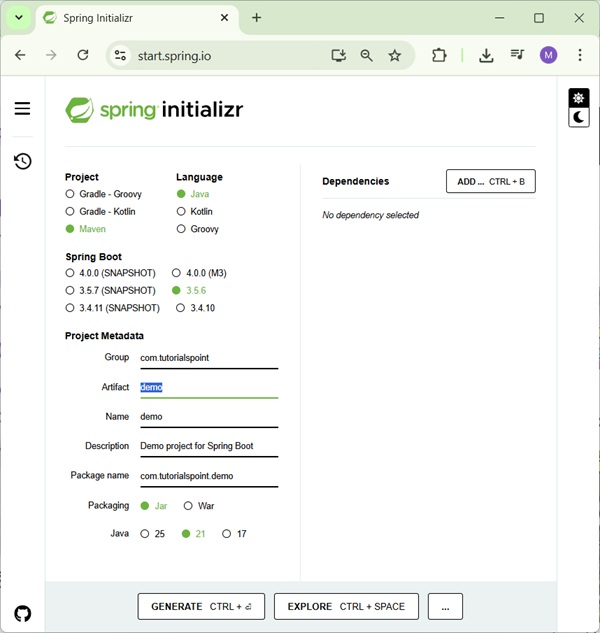

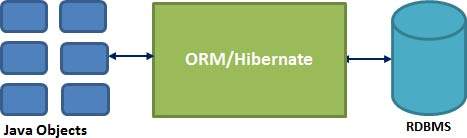
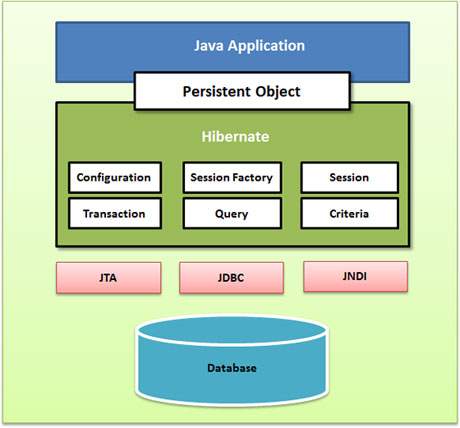


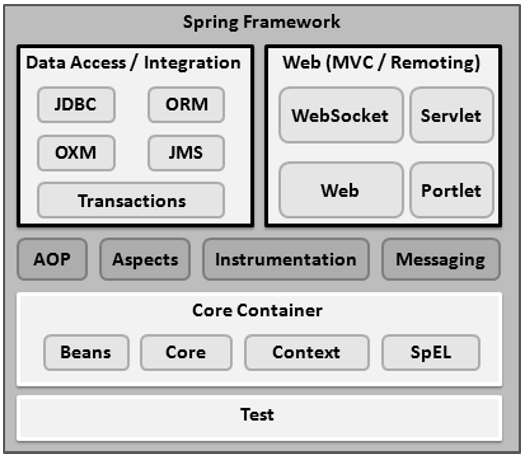


 Beginner's Luck